Last Updated: August 24, 2026
This comprehensive guide explains how to use hashtags strategically to increase your video reach on social media platforms like TikTok, Instagram Reels, and YouTube Shorts. Whether you’re a beginner content creator just posting your first video or an experienced video maker looking to optimize your hashtag strategy using WordPress and SEO tools, this post covers everything you need to know about hashtag selection, placement, and testing for maximum visibility.
If you’ve ever wondered why some videos go viral while others barely get noticed, understanding hashtag strategy is essential knowledge for any content creator, social media marketer, or small business owner looking to expand their online presence through short-form video content.

So, you just made your first video for social media. Maybe it’s a funny skit, a helpful how-to, or a cool dance. You hit “post,” and then… nothing. No views, no likes, no comments. What went wrong? The answer might be simple: you forgot to use hashtags—or you used them the wrong way.
Hashtags are like road signs for social media. They tell the app (like TikTok, Instagram, or YouTube Shorts) what your video is about. When someone searches for a hashtag, your video can show up. Using hashtags the right way can help your video reach more people, even if you’re just starting out. Here’s how to do it.
What Are Hashtags and How Do They Help Video Discovery?
A hashtag is a word or phrase with a “#” symbol in front of it, like #funnycat or #cookingtips. When you add a hashtag to your video’s caption or description, it becomes clickable. People who click on it can see all the other videos that used that same hashtag. This is a great way for new viewers to discover your content.
According to a 2025 Social Media Examiner report, posts with at least one hashtag receive 12.6% more engagement than those without hashtags, and videos using a strategic mix of niche and broad hashtags see up to 40% higher reach than those using only popular tags.
Research from Sprout Social indicates that 70% of hashtags on Instagram are branded, and videos that incorporate a combination of trending, niche, and branded hashtags consistently outperform those relying on generic popular tags alone.
Step 1: Use a Strategic Mix of Small, Medium, and Big Hashtags for Maximum Visibility
Many new creators make the mistake of only using huge hashtags like #viral or #foryou. The problem is that millions of videos already use those tags. Your video will get lost in the crowd. Instead, use a mix of different sizes:
– **Big hashtags** (like #comedy or #dance) have lots of searches but lots of competition.
– **Medium hashtags** (like #momjokes or #beginnerdancer) have fewer videos, so yours has a better chance of being seen.
– **Small hashtags** (like #pugbakingcookies or #howtopaintawaterfall) have very few videos, but the people searching for them really want that exact content.
A good rule is to use 2-3 big tags, 3-4 medium tags, and 2-3 small tags. This gives you a balance of reach and visibility.

Step 2: Ensure Your Hashtags Accurately Match Your Video Content
Never use a hashtag just because it’s popular. If your video is about making pancakes, don’t use #spaceship or #dogtraining. The app’s algorithm (the smart computer that decides what to show people) will notice that your video doesn’t match the hashtag. It might stop showing your video to anyone. Always pick hashtags that describe exactly what’s in your video.
For example, if you made a video about tying your shoes, you could use #howtoshos, #shoelacehack, #lifeskills, #beginnertips, #shoelaces, and #easyhack.

Step 3: Use the Optimal Number of Hashtags for Each Social Media Platform
Different platforms have different rules. Here’s a quick guide:
– **TikTok**: Use 3 to 5 hashtags. Too many can look messy.
– **Instagram Reels**: Use 5 to 10 hashtags. You can put them in the caption or the first comment.
– **YouTube Shorts**: Use 3 to 5 hashtags in the title or description.
If you use too many hashtags, your video might look like spam. If you use too few, people won’t find you. Stick to the numbers above for best results.
Step 4: Create Your Own Branded Hashtag for Community Building
Once you start making more videos, create a unique hashtag just for you. For example, if your channel is called “CoolCraftsWithSam,” you could use #CoolCraftsWithSam. Ask your viewers to use it when they try your ideas. This builds a community and makes it easy for people to find all your videos in one place.

Step 5: Position Your Hashtags in the Right Location for Each Platform
Where you put your hashtags matters. On TikTok and YouTube Shorts, put them in the caption or description. On Instagram, you can put them in the caption or in the first comment. Some creators hide them at the bottom of the caption with a few line breaks. That’s fine too. Just make sure they are there.
Step 6: Research and Leverage Trending Hashtags for Timely Reach
Before you post, look at what hashtags are trending in your topic. For example, if it’s Halloween season, you might use #HalloweenCostume or #SpookySeason. Trending hashtags can give your video a quick boost. But again, make sure they match your content.
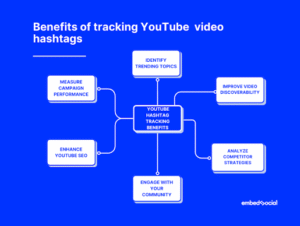
Step 7: Continuously Test and Analyze Your Hashtag Performance
No one gets it perfect the first time. Try different hashtags and see which ones get you more views. Most apps show you video stats. Look at which hashtags your most popular videos used. Then use those same tags again. Over time, you’ll learn what works for your channel.
Final Tips for Achieving Long-Term Hashtag Success
– **Don’t use hashtags that are banned or inappropriate.** Some hashtags are blocked by apps because they were used for spam or bad content. Avoid them.
– **Don’t copy hashtags from huge creators.** What works for a celebrity might not work for you. Find hashtags that fit your size.
– **Be patient.** Hashtags help, but they are not magic. Keep making great videos, and the views will come.

Conclusion
Hashtags are one of the easiest and most powerful tools for getting your videos seen. By using a smart mix of big, medium, and small hashtags, keeping them relevant, and testing what works, you can grow your audience one video at a time. So go ahead—make your next video, add your hashtags, and watch your reach grow. Happy creating!
Todays youtube video:
Frequently Asked Questions About Using Hashtags for Video Reach
How many hashtags should I use on TikTok, Instagram Reels, and YouTube Shorts?
For TikTok, use 3 to 5 hashtags to keep your caption clean and focused. Instagram Reels performs best with 5 to 10 hashtags placed in either the caption or first comment. YouTube Shorts works well with 3 to 5 hashtags in the title or description. Using the right number for each platform helps avoid looking spammy while maximizing discoverability.
What is the difference between big, medium, and small hashtags?
Big hashtags like #viral or #comedy have millions of posts and high competition, making it harder for new creators to stand out. Medium hashtags have moderate usage and give you a better chance of being seen by targeted audiences. Small or niche hashtags have very few posts but attract viewers who are specifically searching for that exact content, often leading to higher engagement rates.
Can using irrelevant hashtags hurt my video performance?
Yes, using hashtags that don’t match your video content can significantly harm your reach. Social media algorithms detect when videos don’t align with their hashtags and may reduce your video’s visibility or stop showing it altogether. Always ensure every hashtag you use accurately describes what viewers will see in your video.
Should I create my own branded hashtag for my video content?
Creating a unique branded hashtag is highly recommended once you start posting consistently. A branded hashtag like #YourChannelName helps build community and makes it easy for viewers to find all your content in one place. Encourage your audience to use your branded hashtag when they engage with or recreate your content, which can increase your overall visibility.
How do I find trending hashtags that are relevant to my video topic?
Check each platform’s discover or explore page to see currently trending hashtags in your niche. You can also use WordPress plugins and SEO tools to research hashtag performance and identify emerging trends. Look at what successful creators in your topic area are using, but always verify that trending tags genuinely relate to your content before adding them.
Where is the best place to put hashtags on social media videos?
On TikTok and YouTube Shorts, place hashtags directly in your caption or video description where they’re immediately visible. For Instagram Reels, you can add hashtags to your caption or hide them in the first comment for a cleaner look. Some creators add line breaks before their hashtags to separate them from the main caption text, which is an acceptable practice that keeps your post looking organized.
How can I track which hashtags are working best for my videos?
Most social media platforms provide built-in analytics that show how viewers discovered your content, including through hashtags. Review your video stats regularly to identify which hashtags appeared on your best-performing videos and use similar tags in future posts. Testing different hashtag combinations and tracking results over time using SEO tools will help you develop an optimized strategy for your specific audience and content type.
📅 Last updated: