Last Updated: June 15, 2026
This comprehensive guide is designed for smartphone videographers, content creators, and social media enthusiasts who want to master the art of vertical video production without experiencing physical discomfort. Whether you’re filming TikToks, Instagram Reels, YouTube Shorts, or any other vertical content, you’ll discover ergonomic techniques, affordable equipment tips, and professional filming strategies that will transform your vertical video game while keeping your body comfortable and pain-free.

Think about it: you’re at a concert, your favorite song starts playing, and you whip out your phone to capture the moment. You hold it sideways, like a civilized human. But then you look at your footage later—and it’s a tiny, letterboxed strip in the middle of your screen, with black bars on the top and bottom. Everyone’s face looks like a shrunken head. Your epic concert video now looks like a postage stamp.
The culprit? You shot horizontally. In a vertical world.
Welcome to the age of vertical videos. TikTok, Instagram Reels, YouTube Shorts—they all love the tall, skinny frame. But here’s the problem: humans are built to hold phones sideways. Our necks aren’t designed for holding a phone straight up for five minutes. Your arms get tired. Your back starts to ache. You look like a confused flamingo trying to take a selfie.
But fear not, brave videographer. You can shoot vertical videos without turning into a pretzel. Here’s how.
According to a 2024 study by Wyzowl, 91% of consumers want to see more online video content from brands, with vertical video consumption on mobile devices increasing by 90% year-over-year—making proper vertical filming techniques more valuable than ever for content creators.
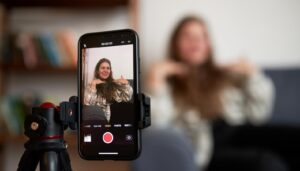
Step 1: Master the Ergonomic “T-Rex Arms” Phone Grip
The biggest mistake beginners make is holding the phone with both hands, elbows locked, arms straight up. This is the “T-Rex Arms” pose. It’s cute for a photo, but after 30 seconds, your shoulders scream for mercy.
Instead, try this: hold your phone with one hand, and rest that hand on your other forearm. It’s like you’re giving yourself a hug. Your arms form a little cradle. This keeps the phone steady and your muscles relaxed. Plus, you look like you’re casually holding a magic wand, not a brick.
Step 2: Use a Selfie Stick or Tripod for Stable Vertical Shots
You don’t need a $500 gimbal. A cheap phone tripod or a selfie stick can save your spine. Extend it, plant it on the ground, and let the stick do the holding. You can stand up straight, like a normal human, and just tap record. Your back will thank you. Bonus: you won’t accidentally cut off your subject’s head because you were too busy shaking.

Step 3: Protect Your Back by Bending at the Knees for Low-Angle Shots
When you have to shoot low (like a dog or a toddler), resist the urge to bend over at the waist. That’s how you pull a muscle and end up walking like a zombie for a week. Instead, squat like you’re about to sit on an invisible chair. Keep your back straight. Your legs are stronger than your lower back. If you’re shooting something on the floor, just kneel. One knee down, the other foot flat. You’ll look like a knight proposing to a phone. It’s fine.
Step 4: Stabilize Your Shots with the Elbow-on-Surface Technique
If you have a table, a chair, a rock, or even your own knee, use it. Rest your elbow on something solid. This turns your wobbly arm into a steady tripod. Your video will be smooth as butter. And your arm won’t feel like it’s about to fall off.
Step 5: Apply the Breathing Technique for Shake-Free Vertical Videos
When you hold your breath to stay still, you actually shake more. Try this: breathe normally, and time your shot with your exhale. As you let the air out, your body relaxes. Press record during that calm moment. You’ll look like a pro, even if you’re just filming your cat trying to fit into a box.

Step 6: Follow the Two-Second Rule for Efficient Short-Form Content
Vertical videos are short. You don’t need a 10-minute epic. Keep clips to 15-30 seconds. That means you only have to hold your phone up for a few seconds at a time. Set a timer. Record, stop, rest. Repeat. Your arms will last all day.
Step 7: Adopt the Portrait-Style Mindset for Better Vertical Framing
Finally, remember that vertical video isn’t just about turning your phone sideways. It’s about filling the frame. Get close to your subject. Don’t worry about showing the whole room. Focus on faces, details, and actions. A vertical video is like a portrait—it’s personal.
The Final Takeaway: Film Vertical Videos Without the Physical Strain
Shooting vertical videos doesn’t have to be a pain in the neck (literally). Use a prop, bend your knees, rest your elbows, and breathe. Your phone is a tool, not a dumbbell. Treat it like one.
Now go forth, film your cat, your concert, or your new recipe. And do it without breaking your back. Your future self will thank you—and so will your chiropractor.
We continue on with our next YouTube Video, I have to practice what I Preach.
Frequently Asked Questions About Shooting Vertical Videos
What is the best aspect ratio for vertical videos on TikTok and Instagram Reels?
The ideal aspect ratio for vertical videos on TikTok, Instagram Reels, and YouTube Shorts is 9:16, which is the standard portrait orientation on smartphones. This ratio ensures your content fills the entire screen without black bars or cropping issues. Most modern smartphones automatically record in this ratio when held vertically.
Do I need expensive equipment to shoot professional-looking vertical videos?
No, you don’t need expensive equipment to create professional vertical videos. A basic selfie stick or phone tripod costing under $20 can dramatically improve your stability and reduce physical strain. Your smartphone’s built-in camera is more than capable of producing high-quality vertical content when combined with proper technique and good lighting.
How can I prevent my vertical videos from looking shaky without a gimbal?
You can achieve stable footage without a gimbal by using the techniques outlined in this guide—rest your elbow on a solid surface, use the breathing technique to time your shots, and hold your phone with the supportive arm-cradle grip. Many smartphones also have built-in optical image stabilization (OIS) that helps reduce minor shakes automatically.
What is the optimal length for vertical videos on social media platforms?
For maximum engagement, keep your vertical videos between 15-60 seconds on platforms like TikTok, Instagram Reels, and YouTube Shorts. This shorter format not only performs better algorithmically but also reduces the physical strain of holding your phone in position. The two-second rule helps you break longer recordings into manageable segments.
Can I convert horizontal videos to vertical format for social media?
Yes, you can convert horizontal videos to vertical format using video editing apps and wordpress plugins, but the results are often less than ideal—you’ll lose significant portions of your footage to cropping. It’s always better to shoot natively in vertical format when you know your content is destined for platforms like TikTok or Instagram Reels. Planning your shot composition for vertical viewing from the start produces far superior results.
How do professional content creators film vertical videos for hours without fatigue?
Professional creators rely on a combination of equipment and technique to film vertical content for extended periods. They use phone tripods, ring lights with phone mounts, and desk stands to eliminate the need for handheld filming during long sessions. When handheld shots are necessary, they employ the ergonomic techniques discussed in this guide and take regular breaks between clips. Many also use seo tools and analytics to plan their content strategically, ensuring they capture only the most essential footage.
What common mistakes should I avoid when shooting vertical videos with my smartphone?
The most common mistakes include holding your phone with locked elbows (the T-Rex pose), bending at the waist instead of the knees for low shots, forgetting to clean your camera lens, and standing too far from your subject. Additionally, avoid filming against bright windows or light sources, as this creates silhouettes. Always tap to focus on your main subject and ensure your phone has adequate storage space before starting a filming session.
📅 Last updated: