Last Updated: June 30, 2026
This comprehensive guide explains why video captions are critical for content creators seeking viral growth on social media platforms like Instagram, TikTok, and YouTube. Whether you’re a beginner just starting your content journey, a seasoned creator looking to optimize your workflow with WordPress and SEO tools, or a brand manager seeking to maximize video engagement, this post breaks down exactly how captions boost algorithmic performance, who benefits from accessible content, what makes captions effective, and how to add them easily using free tools.

Imagine scrolling through your feed on the subway, earbuds in one hand, eyes glued to the screen. You see a video start. You don’t hit play with sound on. In fact, **80% of us** are exactly like that. Whether we’re in a bustling office, a quiet library, or just prefer our digital detox, silence is our default setting.
If your video doesn’t speak visually, you’re talking to an empty room. Captions aren’t just an accessory; they are the bridge between a passerby and a loyal fan
🚀 Why Captions Are Your Algorithm’s Best Friend and Key to Higher Watch Time
Social media platforms like Instagram, TikTok, and YouTube are obsessed with one thing: **watch time**. They love videos that keep people glued to the screen. When viewers drop off because they can’t hear or read the content, the algorithm sighs and stops promoting your post.
But here’s the magic: **Videos with captions fly.** They signal to the platform, “Hey, this content is accessible and engaging!” This boosts completion rates, which tricks the algorithm into pushing your video to *more* eyes. It’s a win-win loop.
According to a study by Instapage, videos with captions see an average of 12% longer watch time, and Facebook reported that captioned video ads increase view time by 12% compared to non-captioned versions—a critical metric that many WordPress publishers and users of SEO tools leverage to improve their content performance.
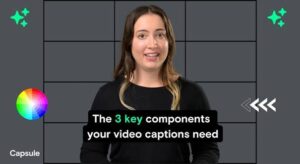
👥 Who Is Actually Watching Your Video Without Sound? (Hint: It’s Not Just You)
Captions unlock doors for a massive, diverse crowd that would otherwise walk right past your content:
* The Commuters: People on trains, buses, or planes who can’t risk hearing audio.
* The Professionals: Colleagues in open-plan offices or conference rooms where silence is golden.
* The Global Citizens: Non-native English speakers who rely on text to catch the nuances of your message.
* The Community: Deaf and hard-of-hearing creators who deserve equal access to your world.
* The Scrollers The 80% who are currently reading this sentence with the sound off.
Ignoring these groups isn’t just rude; it’s leaving money and growth on the table. 📉➡️📈
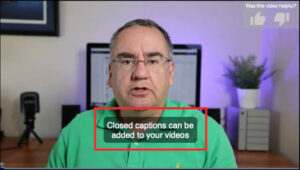
✨ What “Good” Captions Actually Look Like: Best Practices for Readability and Engagement
Not all captions are created equal. Fluffy, messy text is a readability nightmare. Here is the recipe for golden captions:
- Less is More: Keep it punchy. One main idea per line. If you have a long sentence, chop it in two. Your viewer is scanning, not reading a novel.
- Timing is Everything: Text should dance with the words. If the audio says “Hello” and the text appears three seconds later, you’ve lost them. Sync it perfectly!
- Visual Pop: Go bold. Use large, sans-serif fonts in white with a black outline (or a shadow) to ensure they pop against any background.
- Add Flavor: Emphasize key words in bold or change colors for questions and calls to action. Guide their eye like a spotlight. 🎯
- Sound Effects: Don’t let audio go unnoticed! Add small cues like `[upbeat music]` or `[laughs]` so the *feeling* of the video translates even without sound.
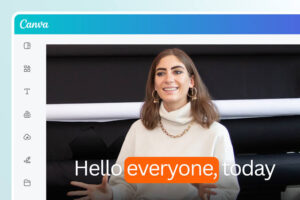
💡 Pro Tip: Avoid the “wall of text” trap. Aim for a maximum of two lines at a time. Give their eyes a moment to breathe while they watch the action.
🛠️ Easy Ways to Add Captions to Your Videos (No PhD Required)
You don’t need a Hollywood budget. Here is how to level up for free:
- Use the Built-in Magic: TikTok, Instagram Reels, and YouTube all have auto-caption features. They aren’t perfect robots, but they are a fantastic starting point. Just spend five minutes editing them for accuracy.
- Try the Powerhouses: Apps like **CapCut**, **VEED**, and **Descript** are game-changers. They let you tweak timing, fonts, and styles with intuitive sliders.
- Create Your Signature Style: Once you find a font and color combo you love, save it as a template. Consistency builds brand recognition.
Remember: Spending five minutes to fix auto-captions is cheaper than posting nothing at all. A slightly imperfect caption is better than no caption.

📊 Test, Tweak, and Thrive: How to Measure Your Caption Performance
Don’t just guess; check the data! After posting a few captioned videos, peek at your analytics. Compare the **average watch time** and **completion rates** of your new posts against your old, silent ones. You’ll likely see a surge within a week or two.
The Ultimate Test: Ask a friend to watch your latest video with the sound off. If they can summarize the entire message without asking “What was that noise?”, you’ve nailed it. If they look confused, trim the text or sync the timing.
🏁 Start Adding Captions Today and Watch Your Engagement Grow
You’re already spending hours planning, filming, and editing. Adding captions is the highest-return task on your to-do list. It costs almost nothing but a few minutes of your time, yet it directly multiplies your reach and understanding.
Next time you hit “post,” add those captions first. Turn those silent scrollers into engaged viewers who watch until the very last frame. Your future audience is waiting to read you. 📝✨
Todays video on youtube:
Frequently Asked Questions About Video Captions and Viral Growth
Why do captions help videos go viral on social media platforms?
Captions help videos go viral because they dramatically increase watch time and completion rates—two key metrics that social media algorithms use to determine which content to promote. When viewers can follow along without sound, they’re far more likely to watch your entire video, signaling to platforms like TikTok, Instagram, and YouTube that your content is engaging and worth showing to more users.
What percentage of people watch videos without sound?
Studies consistently show that approximately 80-85% of social media users watch videos with the sound off, particularly when browsing in public spaces, at work, or during commutes. This means that if your video relies solely on audio to convey its message, you’re potentially missing the vast majority of your audience. Captions ensure your content communicates effectively regardless of sound settings.
What are the best free tools for adding captions to videos?
The best free tools for adding captions include CapCut, VEED, and Descript, all of which offer intuitive interfaces for editing timing, fonts, and styles. Additionally, TikTok, Instagram Reels, and YouTube have built-in auto-caption features that provide a solid starting point. Many WordPress users also integrate these tools into their content workflow alongside SEO tools to maximize video performance on their websites.
How do captions improve accessibility for different audiences?
Captions make your content accessible to deaf and hard-of-hearing viewers, non-native English speakers who benefit from reading along, professionals in quiet office environments, and anyone in sound-sensitive situations like public transit or libraries. By including captions, you’re not only expanding your potential audience but also demonstrating inclusivity and respect for diverse viewing needs.
How long should caption text appear on screen for optimal readability?
Caption text should appear on screen long enough for viewers to comfortably read it—typically matching the pace of spoken words with a slight buffer. Keep each caption to a maximum of two lines and one main idea per line. The text should sync perfectly with the audio, appearing and disappearing in rhythm with the speaker to maintain engagement without overwhelming the viewer.
Can adding captions to my videos improve my SEO and search rankings?
Yes, captions can significantly improve your SEO because search engines can crawl and index the text content within your captions, making your videos more discoverable for relevant search queries. When you embed captioned videos on your WordPress site and optimize them with proper SEO tools, you create additional keyword-rich content that helps your pages rank higher in search results and keeps visitors engaged longer.
How do I know if my captions are working to increase engagement?
Monitor your video analytics to compare average watch time and completion rates between captioned and non-captioned content—you should see measurable improvement within one to two weeks of consistently adding captions. Additionally, conduct the “silent test” by having someone watch your video with sound off; if they can accurately summarize your message, your captions are effective. Engagement metrics like comments, shares, and saves will also typically increase with well-captioned content.
📅 Last updated: